I have three brokerage accounts. That also means I have three incomplete pictures of my own portfolio.
Different parts of it sit with Interactive Brokers, Trading 212 and eToro. Each account exists for a reason, but no single broker can see everything I own.
Many finance apps now ship with a built-in AI assistant. It can summarise the account, explain a holding, answer a quick question. Useful, but it sees only that one broker. It does not know my style, the portfolio rules I have written down or what the other accounts hold.
I connect each broker to the AI I already use. That gives me one analysis layer across all three accounts, while the investments stay exactly where they are.
One portfolio view


Use the assistant that knows your context
 ChatGPT
 Claude
The setup in plain terms
My accounts are split deliberately. Interactive Brokers holds my ETF investments, eToro runs my public portfolio, and Trading 212 is where I test strategy ideas. If you want the reasoning behind running several brokers at once, I covered it in The Right Way to Use Multiple Stock Brokers in 2026.
Each of these brokers offers a way to share account data with outside tools. I use that access to feed my holdings into the AI I already work with every day, either ChatGPT with Codex or Claude with Claude Code. The AI reads the data from all three accounts and answers questions about the combined picture in one conversation.
I am not a programmer. The first connection involves some technical steps, but the AI tools handle most of the work when you describe what you want in plain language, and daily use afterwards is asking questions.
In my video I show what this looks like. I ask Claude which stock has performed best across all three accounts, and it answers from the combined data. I also have it build a small dashboard with my holdings grouped by broker, by sector and by exposure.
I also use aggregation apps like Delta and Snowball, and they are good at showing totals. What the AI adds is the conversation: when a figure surprises me, I can ask what sits behind it and keep going with follow-up questions about my own holdings.
What a built-in broker assistant cannot see
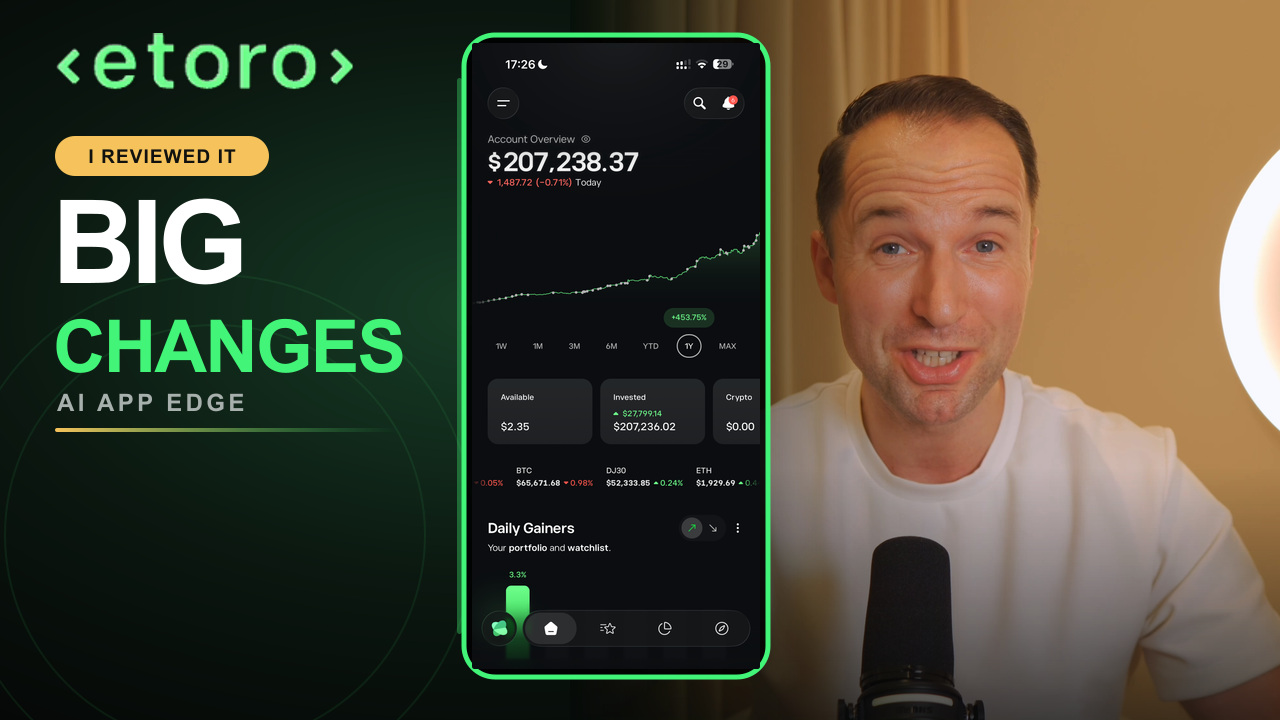
Broker assistants are getting better. eToro has rebuilt its app around AI, and I shared my experience in I Tested eToro's New AI App. My Honest Verdict. Inside a single account, these assistants are useful.
The limitation is that a built-in assistant sees only the account it belongs to. My setup sees all three, plus the material I have documented over time: written investing rules, a target allocation, notes on why certain positions exist.
That combination changes the answers. When I ask whether the portfolio still matches my plan, the assistant checks the combined holdings from three brokers against the rules I wrote myself.
Sees one account and only the context stored inside that app.
Sees the combined holdings plus the investing rules you provide.
What I actually ask it
The questions are ordinary portfolio questions. They were hard to answer before because the data lived in three places.
- Where do my ETFs and individual holdings overlap?
- What is my combined sector and currency exposure?
- How much cash is sitting idle across the accounts?
- Which positions drive most of my concentration?
- Does the combined allocation still match my written plan?
- What should go on my research list next?
That last question feeds into my normal process. The AI builds a shortlist, the analysis follows the same steps I described in How I Research a Stock in 5 Minutes, and the decisions remain mine.
The one security rule I do not break
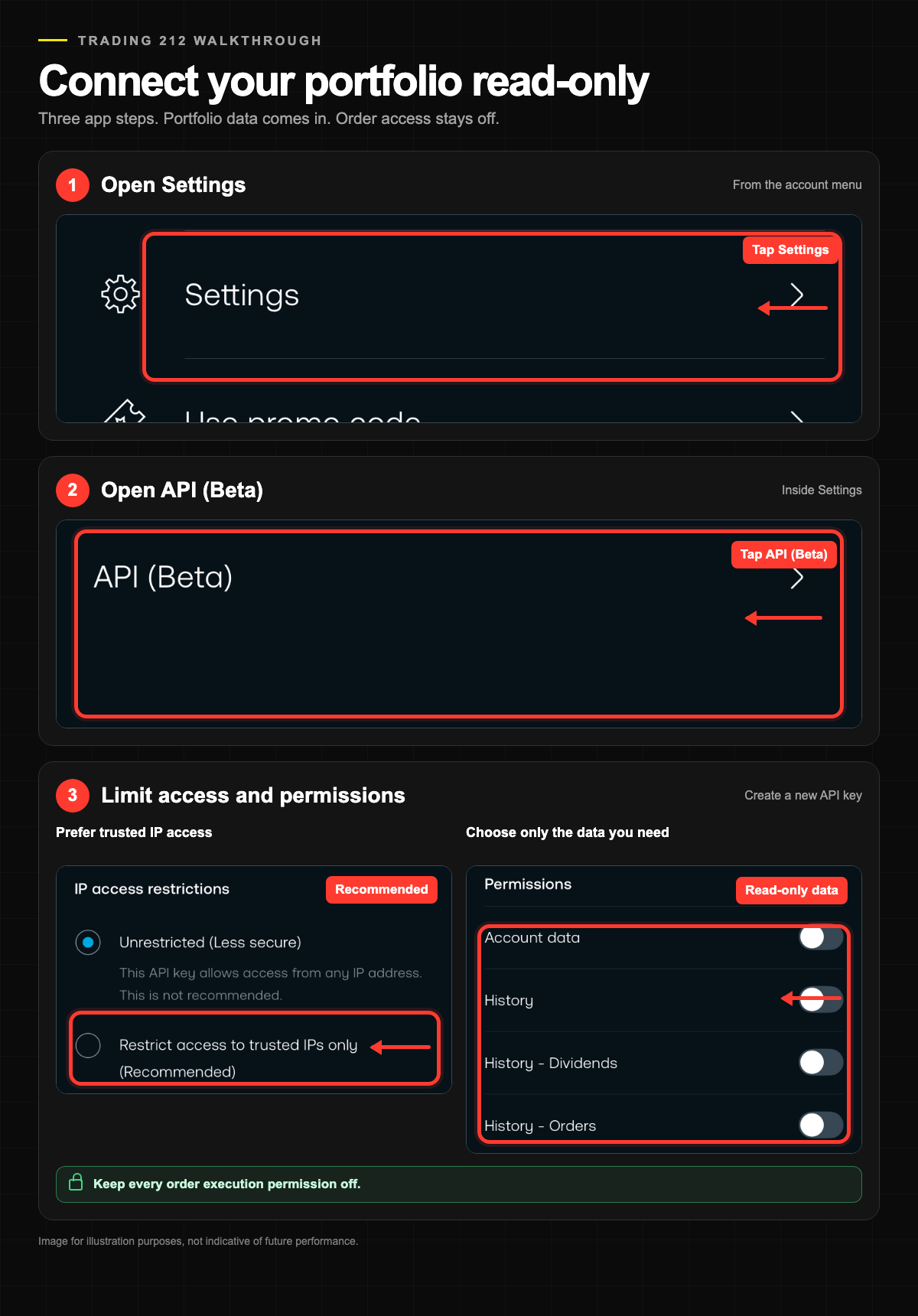
My rule for this workflow is read-only access, with no exceptions. The AI can view my accounts and cannot act in them. I do not want an assistant placing orders on my behalf, so I never grant trading permissions.
The credential can retrieve portfolio information. It has no permission to place, change or cancel orders.
A few habits support the rule. I scope every API key as narrowly as the broker allows. I restrict keys to trusted IP addresses where the broker supports that option. I store credentials through secure local configuration, following the documentation of the tool I am using. And I never paste a key into an ordinary chat message.
A key like this is a separate credential with its own limited permissions, and you can revoke it in your broker settings at any time. Where your data is stored and processed depends on your setup, so understand what your chosen tools do with the information before you connect a live account.
Connecting Trading 212 step by step
Trading 212 has the most straightforward setup of my three brokers, so this is the one I will show in detail.
In the platform, open Settings, then API (Beta), then Generate API key. Trading 212 lets you decide what the key is allowed to do, so choose the narrowest permissions that still cover reading your portfolio, and add a trusted IP restriction if that fits how you work. You receive a key and secret pair, and both belong in secure local configuration.
Two caveats. The feature carries a Beta label, and availability is currently limited to supported account types, so not every customer will see the option and the details can change. If you are new to the platform itself, start with How to Invest With Trading 212 before adding an API connection.
Interactive Brokers and eToro take different routes
Each broker exposes account data in its own way, with its own permissions and connection methods. Before you plan a setup, check that the method your broker offers is available for your account type and works with the AI tool you intend to use.
Interactive BrokersIBKR documents Web API, TWS API, reporting tools and Flex Web Service routes. It also launched a Claude connector in June 2026.
eToroeToro offers an official Public API and MCP server for compatible AI code editors. Access depends on account and region.
Interactive Brokers
IBKR documents several routes into your account data, including a Web API, the TWS API, reporting tools and the Flex Web Service. Which one fits depends on what you want to pull. IBKR has also moved toward official AI support: it launched a Claude connector in June 2026 and ran an official session on portfolio insights with Claude in July 2026.
eToro
eToro now offers an official Public API and an official MCP server. MCP is a standard that lets AI tools connect to outside data sources, and eToro's server works with compatible AI code editors. A verified eToro account is required for API access, and availability can differ by account and region.
ChatGPT or Claude
I use both, and I switch between them without much thought. ChatGPT with Codex and Claude with Claude Code each handle this workflow well.
After months of switching, my conclusion is that the model matters less than the inputs. The value sits in the broker data, in the investing rules I have written down and in the context that builds up over time. Move that foundation to either assistant and the answers feel similar. Start with the AI you already use and pay for, and build there.
What this setup does not do
AI output can be wrong, and it can be stale. Connections hiccup, data arrives with quirks, and a model will sometimes state a figure that does not survive a check against the account. My broker statements remain the source of truth, and I verify numbers there before I act on anything.
The assistant does not make decisions either. It analyses the accounts and suggests what deserves research, and every investment decision still goes through me.
You also do not need my exact setup. Three brokers reflects how my accounts are organised, and one supported broker with a read-only key answers most of the questions on my list, provided the connection works with your AI tool and account type. Start with one and expand if the workflow proves useful.
See the full setup in action
The complete guide includes the live demo across all three brokers and the dashboard build.
Watch the full guideOne question before you go: if your AI could see your complete portfolio today, what would you ask it first?
Frequently asked questions
A correctly scoped read-only credential can retrieve information such as holdings, balances and history, and it carries no permission to place, change or cancel orders. It still needs protection: store it securely, rotate it if it is ever exposed, and revoke it in your broker settings once you no longer need it.
No. I am not a programmer. Setting this up means following the broker's documentation and letting a tool like Claude Code or Codex handle the technical part, because you can describe what you need in plain language. After the initial setup, using it is a conversation.
Any broker with a documented way to access your own account data, as long as that method works with the AI tool you plan to use and is available for your account type. I use Interactive Brokers, Trading 212 and eToro, and each one takes a different route. Availability varies by broker, account type and region, so check the current documentation on both sides before you start.
Whichever one already sits in your daily workflow. I switch between both. The results depend more on the account data and the written rules you provide than on the model behind the chat.
Not in my setup. The keys I use carry no order permission, so trades cannot go through the assistant. Every trade happens in the broker directly, after I have checked the numbers myself.
eToro is a multi-asset investment platform. The value of your investments may go up or down. Your capital is at risk.
This article is for educational purposes only and does not constitute investment advice. Broker and AI features vary by account, region and product. This article contains affiliate links, meaning I may earn a commission if you sign up through them, at no additional cost to you.