
Yes, you can have multiple Interactive Brokers accounts under a single login. IBKR lets you add individual, joint, trust, and custodial accounts to your existing profile, free of charge. You use one username, one password, and switch between accounts in one click. Internal transfers between your accounts are free and instant.
I hold multiple accounts with IBKR myself and went through the setup process after I had already been using the platform for years. In this guide I will walk you through exactly why you might want a second account, the account types available, and the step-by-step setup from your existing Client Portal.
Why Open a Second IBKR Account
Most IBKR users end up with more than one account eventually, and each reason maps to a specific account type. Here are the six most common setups I see, and the one I use myself:
The common thread: every one of these setups gives you cleaner reporting, fewer mental trade-offs inside a single portfolio, and a tax trail that is easier to follow at year end. The same logic applies one level up to brokers themselves. I wrote about why IBKR is my ETF vault in a broader multi-broker setup where each platform has one specific job.
Types of Additional Accounts IBKR Supports
Here is how the account types compare at a glance:
| Account type | Best for | Extra requirements |
|---|---|---|
| Individual | Separating strategies under your own name | None, fully pre-filled from existing profile |
| Joint | Partner, spouse, household investing | ID and tax details for the second holder |
| Custodial | Investing for a minor child | Minor's ID, proof of relationship |
| Trust | Managing assets within a trust structure | Trust deed and trustee documentation |
| Entity / Business | Limited company or SMSF investing | Company registration, beneficial owner info |
| Retirement | IRA, SIPP, or regional pension equivalent | Varies by jurisdiction |
How to Open a Second IBKR Account: Step-by-Step
The whole process takes under 10 minutes from your existing Client Portal. Here is the flow:
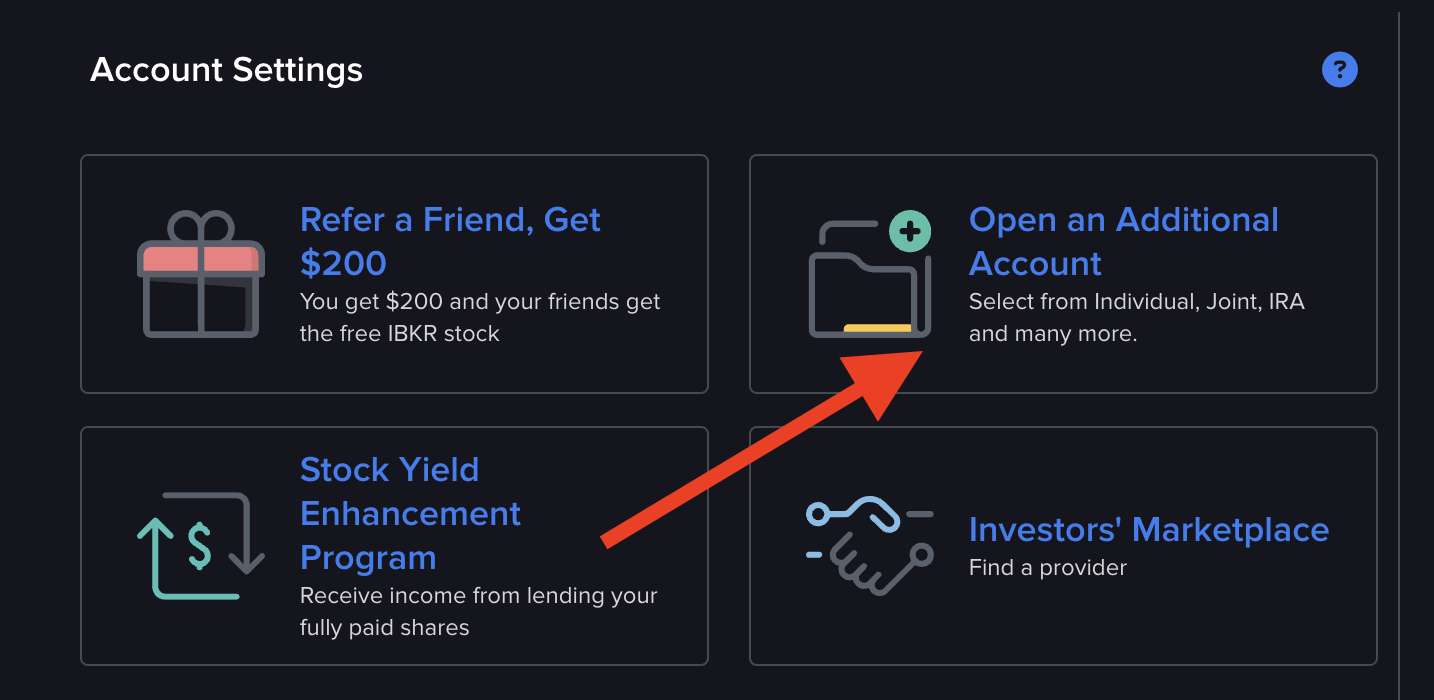
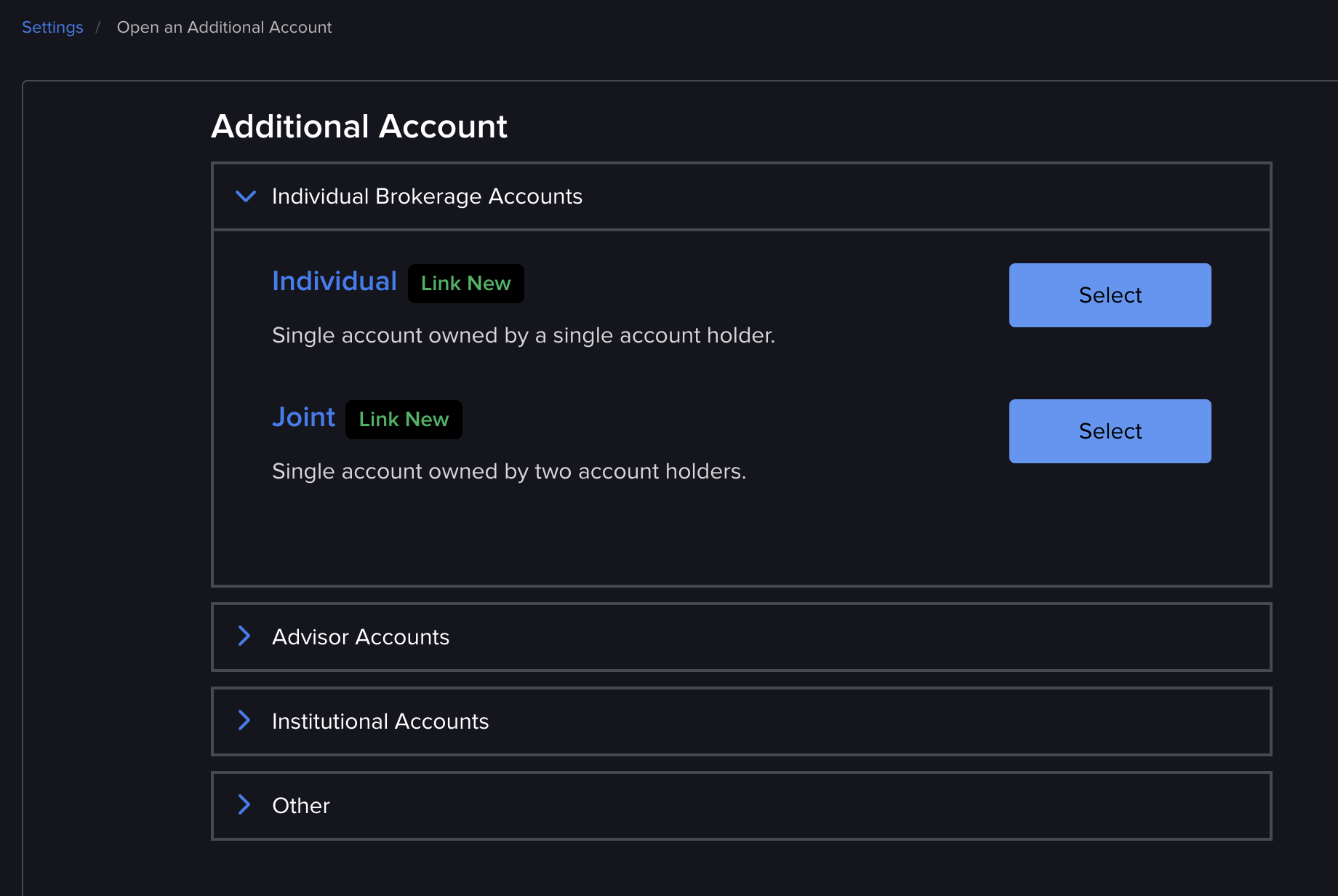
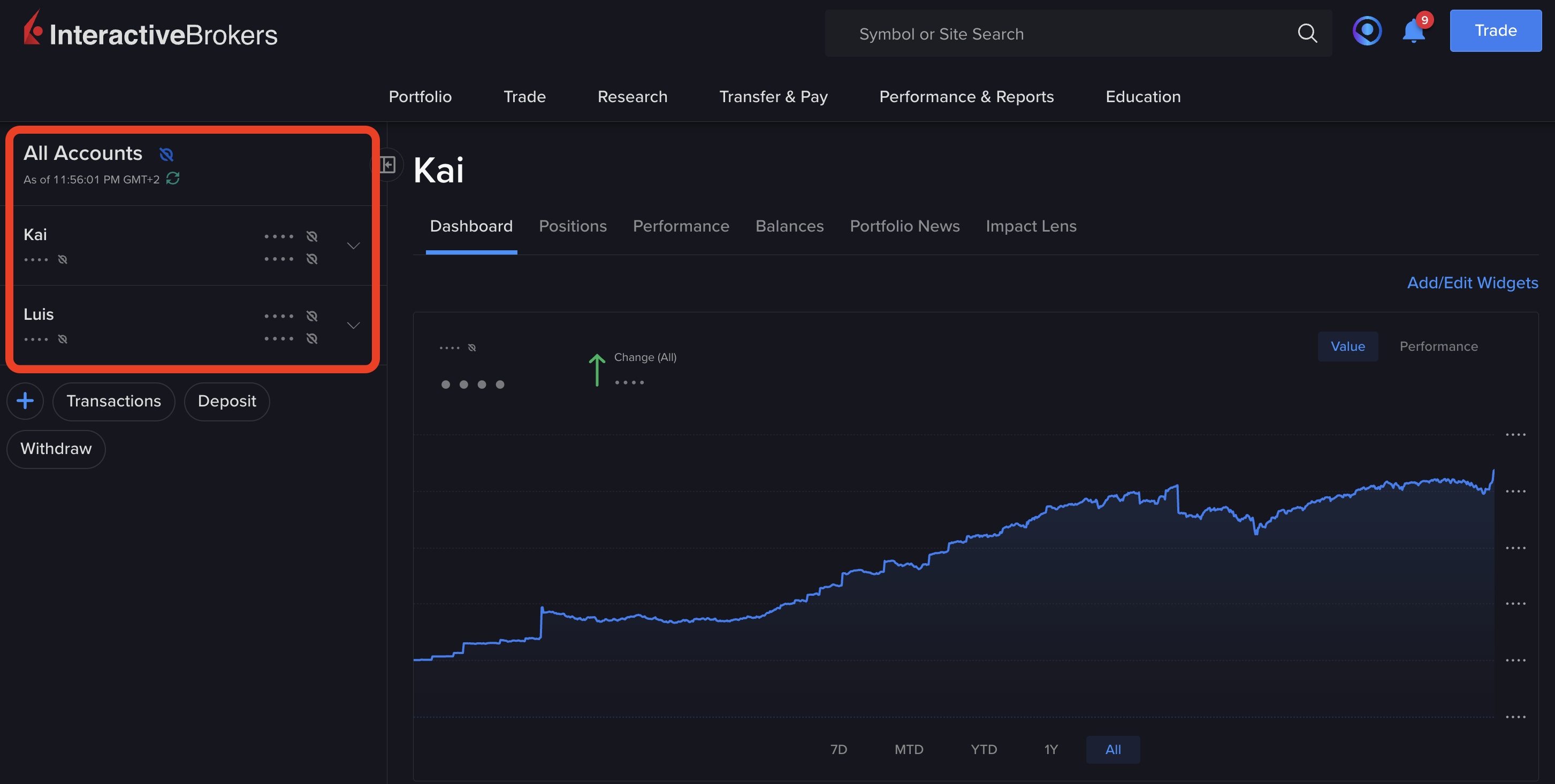
What to Know Before You Open a Second Account
- Single login, multiple accounts: one username and password for everything. Switch between accounts in the Client Portal or mobile app with one click.
- Fully separate portfolios: each account has its own cash balance, positions, and transaction history. No mixing.
- Margin calculated per account: multiple accounts do not combine buying power. Each is evaluated independently.
- Separate tax reports: IBKR generates a clean tax statement per account, which simplifies filing if you split by strategy or entity.
- Market data subscriptions: may need separate subscriptions per account depending on your data package. Check the fees section in Settings.
- Account minimums: generally no minimum deposit on standard individual accounts, but some specialty types and regions have thresholds.
Practical Tips from Managing Multiple Accounts
Name each account clearly. IBKR lets you set a nickname per account. I use names like "Long-Term Portfolio" and "Active Trading" so I never mix them up when placing an order. A misrouted trade is one of the easiest mistakes to avoid.
Use internal transfers, not bank transfers. Moving money between your own IBKR accounts is free and instant. Bank transfers can take days and sometimes cost fees.
Set base currencies deliberately. If one account is for US stocks and another for European, set USD and EUR respectively. This avoids unnecessary FX conversions. If you do need to convert, auto vs manual FX in IBKR explains which is cheaper.
Use the consolidated portfolio view. The Client Portal can show all your accounts at once. Useful for seeing total net exposure across strategies and reviewing it against your portfolio checklist.
Stick with one broker if you can. Before opening a second IBKR account, ask whether it is the right broker for all of your use cases. My best UK brokers for 2026 breakdown helps with that decision, especially if some of your setups (for example, fractional shares or small recurring deposits) might fit a different platform like Trading 212 better.
Is IBKR the Right Broker for Multiple Accounts?
Short answer: for most investors with multi-account needs, yes. IBKR is one of the few brokers that treats multi-account as a first-class feature rather than an afterthought. One login, free internal transfers, consolidated reporting, and support for joint, custodial, trust, and entity structures all under the same roof. Full details on the flow are on IBKR's official account types page.
If you are already on IBKR, adding a second account is a 10-minute job. If you are not yet on IBKR and you know you will eventually want multiple setups (for your partner, your kids, or a separate strategy), opening your first account with IBKR is the cleanest long-term choice.
Frequently Asked Questions
Yes. IBKR lets you open multiple accounts under one login. You can add individual, joint, trust, custodial, entity, or retirement accounts to your existing profile. All accounts share the same username and password, and internal transfers between them are free and instant.
There is no hard cap for individual investors. Most people end up with 2 to 5 accounts: a personal portfolio, a joint with a partner, and one or more custodial accounts for children. Advisor and institutional setups can manage hundreds of sub-accounts under one master.
Yes. IBKR supports custodial accounts (UGMA or UTMA in the US, regional equivalents elsewhere) that you manage on behalf of a minor. You control all investment decisions until they reach the age of majority, at which point ownership transfers to them.
Yes. You can open a joint account with a spouse or partner. Both holders have equal access and can place trades. The joint account sits alongside your personal account under the same login, so you switch between them with one click.
No. Every account you open under your profile uses the same username and password. You switch between them from the Client Portal or mobile app without logging out.
No. Opening additional accounts is free, and internal transfers between your own accounts are free and typically instant. You may need a separate market data subscription per account depending on the data package you use.
Disclaimer: Investing involves risk. The value of your investments can go down as well as up, and you may get back less than you invest. This article is for informational purposes only and does not constitute financial advice. This article contains affiliate links, meaning I may earn a small commission if you sign up through them, at no additional cost to you.


